DOOH Advertising
How to Choose the Right Screen Size for Outdoor Advertising Displays
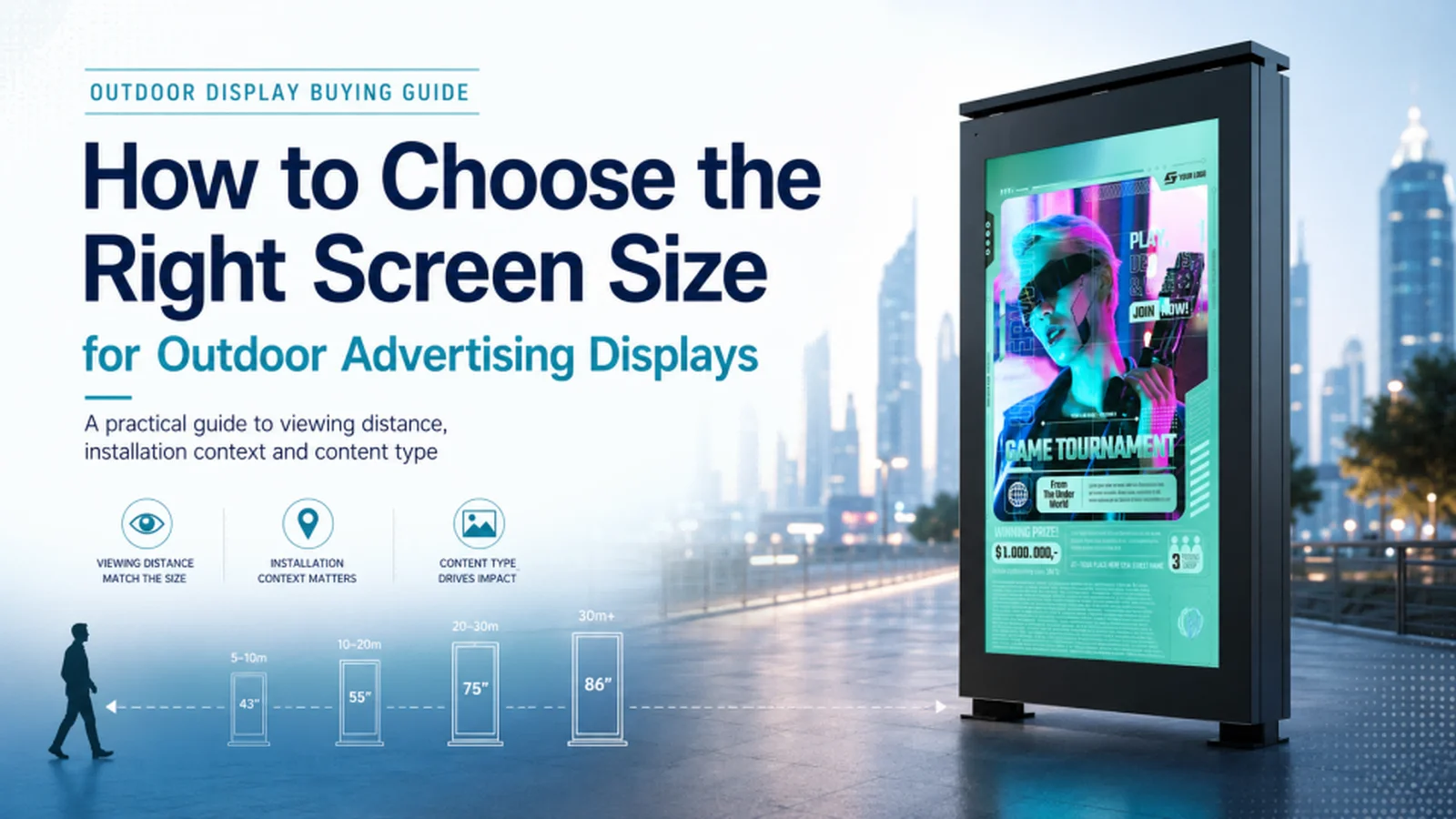
Selecting an outdoor advertising display is not simply a matter of choosing the largest screen that fits the budget. A 65-inch display installed on a narrow sidewalk may be too large for pedestrians viewing it from one meter away. The audience may be unable to take in the entire layout comfortably, especially when passing the screen quickly.
July 24, 2026
 ChatGPT
 Grok
Grok Perplexity
 Claude
Choosing the Correct Screen Size for Outdoor Advertising Displays
Selecting an outdoor advertising display is not simply a matter of choosing the largest screen that fits the budget.
A 65-inch display installed on a narrow sidewalk may be too large for pedestrians viewing it from one meter away. The audience may be unable to take in the entire layout comfortably, especially when passing the screen quickly.
At the other extreme, a 32-inch display mounted on a building facade may have little impact on people viewing it from across a parking lot or public plaza.
The correct screen size depends primarily on three factors:
- Viewing distance
- Installation environment
- Content type
Buyers should also work closely with experienced outdoor digital kiosks suppliers to confirm that the proposed screen size, orientation, brightness and enclosure design are suitable for the actual location.
When these factors are evaluated together, operators can select a display that is readable, visible and appropriate for the physical environment.
1. Start with Viewing Distance
Viewing distance is the typical space between the audience and the display.
The farther away the audience is, the larger the screen will generally need to be. However, screen size should remain appropriate for the physical setting and the amount of information shown.
The following ranges provide a practical starting point:
Screen Size Optimal Viewing Distance Maximum Effective Distance
32 inches 1–2 meters 5 meters
43 inches 1.5–3 meters 8 meters
49 inches 2–4 meters 10 meters
55 inches 2.5–5 meters 12 meters
65 inches 3–6 meters 15 meters
75 inches 4–8 meters 20 meters
86 inches 5–10 meters 25 meters
98 inches and above 6–15 meters 30 meters or more
1.1 Useful Formulas
Optimal viewing distance (meters) ≈ screen diagonal (inches) × 0.04
Maximum effective distance (meters) ≈ screen diagonal (inches) × 0.1
For example, a 55-inch display would have an estimated optimal viewing distance of approximately 2.2 meters and a maximum effective distance of approximately 5.5 meters under the formula.
In practice, the display may remain visible from farther away when it uses large text and simple graphics. However, detailed maps, prices and directory information will normally require a shorter viewing distance.
These formulas should therefore be treated as starting points rather than absolute rules. Content design, screen brightness, mounting height and audience movement can all affect the actual result.
2. Match the Screen to the Installation Environment
The same screen size may perform very differently depending on where it is installed.
2.1 Sidewalks and Pedestrian Areas
Pedestrians usually pass sidewalk displays from a distance of approximately one to three meters.
For these applications, a 43- to 55-inch screen is generally suitable. Portrait orientation often works well because it matches the proportions of a standing person and uses limited sidewalk space efficiently.
Pedestrians may only look at the display for two or three seconds. Content should therefore use:
- Large text
- Strong visual contrast
- Simple messages
- Limited calls to action
- Easily recognized images
Installing an oversized display in a narrow pedestrian area may increase hardware, structural and power costs without improving communication. A 65-inch screen may appear more impressive in a product catalog, but viewers standing close to it may struggle to absorb the full message.
2.2 Storefronts and Retail Entrances
Storefront displays are commonly viewed from across a sidewalk, entrance area or small plaza. Typical viewing distances range from approximately three to eight meters.
A 55- to 65-inch display can provide enough visual presence to compete with printed signs, window displays and surrounding architecture.
Portrait or landscape orientation may be appropriate depending on the proportions of the storefront and the direction from which people approach.
Operators should evaluate whether the display will be seen primarily by:
- Pedestrians walking parallel to the building
- Shoppers approaching the entrance
- People standing across the street
- Drivers passing the storefront
A portrait display may work well beside an entrance, while a landscape screen may be more appropriate above a doorway or across a wide facade.
2.3 Parking Lots and Transportation Hubs
Displays in parking areas, train stations, bus terminals and large waiting zones may need to communicate with audiences five to 15 meters away.
Screen sizes between 65 and 86 inches are often more appropriate for these locations. Landscape orientation can provide a wider viewing area, particularly when people approach from several directions.
Content should remain readable from different positions and should not depend on small text or detailed graphics.
For transportation information, operators should prioritize:
- Large arrival and departure times
- High-contrast route numbers
- Clear directional arrows
- Limited information on each screen
- Consistent content hierarchy
The screen may need to serve both close-range and long-distance viewers. In that case, the most important information should remain large, while secondary details can be displayed in smaller sections.
2.4 Building Facades and Large Public Plazas
Displays installed on building exteriors or in large public spaces may be viewed from 10 to 30 meters away or more.
At these distances, an 86-inch or larger display may be required. For especially large viewing areas, a modular LED display or video wall may be more suitable than a conventional LCD panel.
The decision should be based on:
- Viewing distance
- Required image size
- Available mounting structure
- Audience density
- Content resolution
- Site brightness
- Total installation cost
Large screens also create greater wind loads. Mounting systems, walls and support structures may require professional engineering assessment.
In some cases, increasing the LCD size is not the most cost-effective solution. Once the required display area becomes very large, LED technology may provide greater scalability and visibility.
2.5 Drive-thru Lanes and Vehicle-facing Displays
Displays used in drive-thru lanes are commonly viewed from approximately three to 10 meters through a vehicle window.
Screen sizes between 32 and 55 inches may be appropriate, depending on lane configuration, stopping distance and the number of menu items shown.
Landscape orientation generally matches the viewing area available through a vehicle window and works well for menu layouts.
Because drivers have limited time to read the screen, content should feature:
- Large prices
- Clear product images
- Simple category organization
- Limited promotional messages
- Strong contrast between text and background
A larger screen does not automatically improve ordering efficiency. A crowded 65-inch menu may still be more difficult to read than a well-designed 49-inch display.
3. Consider What the Screen Will Display
Screen size should also reflect the purpose of the content.
3.1 Brand Advertising
Brand-awareness campaigns often benefit from larger displays because screen presence is part of the communication strategy.
Displays of 55 inches or more can help promotional content attract attention in retail, transportation and public environments.
Creative content should emphasize:
- Strong imagery
- Minimal text
- Recognizable brand elements
- One clear message
- Short display duration
For this application, the primary performance measures may include impressions, estimated audience reach and engagement with a call to action.
3.2 Wayfinding and Directories
Wayfinding systems often need to display maps, destination lists and directional information.
A medium-sized display between 43 and 55 inches can provide a practical balance between readability, cost and physical footprint.
Screen size alone does not guarantee usability. Designers must also consider:
- Font size
- Map complexity
- Viewing height
- Color contrast
- The number of destinations displayed
- Whether the screen is interactive
The key performance measure is whether users can find the required information quickly and accurately.
A large screen filled with an overly complicated map may still create confusion. Reducing the amount of information displayed at one time may be more effective than increasing the screen size.
3.3 Interactive and Self-service Applications
Interactive kiosks are normally used at close range, making extremely large displays unnecessary.
A 43- to 55-inch portrait screen is often sufficient for standing users. The display should be large enough to present clear navigation without placing important controls outside a comfortable reach range.
Touch interfaces should include:
- Large, clearly separated buttons
- Simple navigation
- Consistent control placement
- Accessible text sizes
- Important controls within comfortable reach
For interactive applications, the physical position of the screen may be more important than the diagonal measurement alone.
3.4 Digital Menu Boards
Menu boards often benefit from landscape orientation because categories, product images and prices are arranged horizontally.
Displays between 49 and 65 inches can work well, although the final size depends on the number of items, the customer’s ordering distance and the available wall space.
A larger display should not be used as an excuse to add more information. Overloaded menu layouts may remain difficult to read even on a large screen.
Content designers should prioritize the most profitable or popular items and divide complicated menus across multiple screens when necessary.
4. Portrait or Landscape?
Orientation changes the physical footprint of a display even when the diagonal measurement remains the same.
Screen Size Approx. Portrait Dimensions Approx. Landscape Dimensions
43 inches 59.5 × 106 cm 106 × 59.5 cm
55 inches 77.1 × 137.1 cm 137.1 × 77.1 cm
65 inches 91 × 161.9 cm 161.9 × 91 cm
Portrait orientation is generally well suited to:
- Sidewalk advertising
- Freestanding outdoor totems
- Interactive directories
- Human-height information displays
- Retail promotions
Landscape orientation is commonly used for:
- Menu boards
- Building facades
- Parking information
- Vehicle-facing displays
- Wide-format advertising
- Transportation schedules
Operators should verify that the selected display is designed to operate continuously in the required orientation.
Not every LCD panel performs equally well when rotated. Depending on the panel design, portrait installation may affect heat distribution, viewing angles or backlight uniformity.
When comparing outdoor digital kiosk suppliers, buyers should confirm that the proposed screen supports portrait or landscape operation rather than assuming that any display can simply be rotated. They should also review the enclosure design, cooling system, mounting method and service access for the intended orientation.
5. How Suppliers Influence Screen-size Selection
Screen size should not be selected from a product catalog alone.
Reliable outdoor digital kiosk suppliers should evaluate how the display will be viewed, installed, powered and maintained before recommending a specific model.
Buyers should provide suppliers with information such as:
- The closest viewing distance
- The typical viewing distance
- The maximum required viewing distance
- Pedestrian or vehicle traffic direction
- Available installation space
- Required portrait or landscape orientation
- Mounting height
- Structural limitations
- Sunlight exposure
- Local temperature and weather conditions
- Content type
- Expected operating hours
This information allows the supplier to determine whether a proposed screen is appropriately sized for the location.
For example, a supplier may recommend a 55-inch portrait kiosk rather than a 65-inch model for a narrow sidewalk because pedestrians will view the content at close range. In a parking area or transportation hub, the same supplier may recommend a larger landscape display to improve readability across a wider space.
Experienced outdoor digital kiosks suppliers should also explain how increasing the screen size affects:
- Enclosure weight
- Wind loading
- Foundation requirements
- Power consumption
- Thermal management
- Transportation
- Installation labor
- Long-term maintenance
These factors can materially change the total cost of the project.
Buyers should request dimensional drawings, power requirements and mounting specifications before approving a screen size.
6. Understand the Cost of Moving to a Larger Screen
Display cost generally increases with screen area rather than diagonal measurement alone.
Moving from a 55-inch screen to a 65-inch screen increases the visible area by approximately 40%. The corresponding price increase may be around 30% to 50%, depending on brightness, enclosure design and other specifications.
A larger display may provide better value per square inch, but it also introduces additional costs.
6.1 Mounting and Structural Support
Larger displays require stronger mounting systems.
Wind pressure increases with surface area, meaning a 65-inch outdoor display can experience significantly more force than a 43-inch display in the same location.
Wall structures, foundations and mounting brackets must be designed for both the display weight and environmental loads.
A larger freestanding kiosk may require:
- A wider base
- More anchor points
- A larger concrete foundation
- Additional structural reinforcement
- More installation space
These requirements should be evaluated before the screen is ordered.
6.2 Power Consumption
Larger displays typically consume more electricity.
A 65-inch outdoor display may require approximately 50 to 100 watts more power than a comparable 55-inch unit, depending on brightness and operating conditions.
Power consumption should be included in the total cost of ownership, particularly for networks operating many displays for extended daily hours.
Automatic brightness adjustment can reduce energy use by lowering screen brightness at night or during cloudy conditions.
6.3 Thermal Management
High-brightness outdoor LCD panels generate heat.
As screen size increases, the enclosure may require:
- More airflow
- Larger cooling fans
- Additional air filters
- A more capable heat exchanger
- Air conditioning in extreme climates
This can increase equipment cost, power consumption and maintenance requirements.
A display that cannot maintain a safe internal temperature may reduce brightness automatically, shut down or experience a shorter component life.
6.4 Installation Complexity
Larger displays are heavier and more difficult to transport, lift and position.
Installation may require:
- Additional technicians
- Lifting equipment
- Larger access routes
- Stronger foundations
- More extensive structural assessment
- Traffic or pedestrian management during installation
The largest display that physically fits the location may not be the most economical or practical choice.
7. A Practical Selection Guide
Installation Scenario Recommended Size Typical Orientation
Sidewalk kiosk viewed at close range 43–55 inches Portrait
Storefront display viewed across a sidewalk 55–65 inches Portrait or landscape
Parking lot directory 65–86 inches Landscape
Interactive wayfinding kiosk 43–55 inches Portrait
Drive-thru menu board 32–55 inches Landscape
Building facade advertising 86 inches or larger, or LED Landscape
Transit shelter display 49–55 inches Portrait or landscape
These recommendations should be adjusted after evaluating the actual site.
A basic site assessment should record:
- Closest viewing distance
- Typical viewing distance
- Farthest required viewing distance
- Pedestrian or vehicle movement
- Screen mounting height
- Available installation space
- Audience traffic direction
- Nearby visual competition
- Direct sunlight exposure
- Maintenance access
8. Avoid Choosing Size in Isolation
Screen size is only one part of outdoor display performance.
A large screen with insufficient brightness may still be difficult to read in direct sunlight. A high-brightness display may also underperform when the text is too small, the content contains too much information or the viewing angle is poorly planned.
The final decision should consider screen size together with:
- Brightness
- Resolution
- Contrast
- Viewing angle
- Content design
- Mounting height
- Weather protection
- Thermal management
- Maintenance accessibility
- Structural requirements
Resolution is particularly important when content contains detailed text or images. However, higher resolution does not compensate for text that is too small for the viewing distance.
Brightness must also match the site. A display installed in direct sunlight will generally require a higher brightness level than one installed under a shelter or building canopy.
Mounting height affects both visibility and viewing angle. A screen placed too high may be easy to see from a distance but uncomfortable to read at close range.
9. Test the Proposed Size Before Purchasing
Whenever possible, operators should test representative content at the intended viewing distance.
A temporary printed mockup can help stakeholders understand how the proposed screen size will appear before the equipment is ordered.
The mockup should reproduce:
- The planned physical dimensions
- Approximate text sizes
- Key images
- Mounting height
- Portrait or landscape orientation
Teams can then view the mockup from the closest, typical and farthest audience positions.
A digital simulation or augmented-reality visualization may also be useful for large projects.
Testing can identify issues that may not be obvious from technical drawings, such as:
- Text that appears too small
- A display that overwhelms a narrow space
- Obstructed sightlines
- Poor orientation toward approaching traffic
- Insufficient visual impact from a distance
10. Conclusion
Choosing the correct screen size for an outdoor advertising display requires matching the hardware to the audience, content and installation environment.
Viewing distance provides the starting point, but orientation, mounting height, structural requirements, brightness and operating conditions must also be considered.
Bigger is not automatically better. A properly sized display can deliver stronger readability, lower installation costs and better overall performance than an oversized screen placed in the wrong environment.
Before selecting a model, buyers should measure the expected viewing distances, evaluate how people move through the site and test whether the proposed content remains clear under realistic conditions.
Working with qualified outdoor digital kiosk suppliers like MWE Display can also help buyers avoid selecting a screen based only on diagonal size. A knowledgeable supplier should consider visibility, enclosure engineering, thermal management, wind loading and long-term maintenance as part of the recommendation.
This site-based approach helps ensure that the selected display supports the communication objective rather than simply occupying more space.
Included In This Story

MARVEL TECH GROUP CO., LTD.
Make Win Easy
MWE manufactures commercial-grade LCD/LED digital signage for retail, QSR, and DOOH applications. Specializing in IP65-rated outdoor displays (2500-5000 nits), indoor video walls, LED poster displays, and Android-based solutions. Regional stock in USA/Germany. Tier-1 components (Samsung, LG, BOE). Built for reliability.
Related Media
Featured Vendor

OptiSigns is a cloud-based digital signage software that helps organizations create, manage, and scale engaging screen content across any display. With powerful integrations, flexible scheduling, and easy remote management, OptiSigns makes digital signage simple for teams of any size.
Subscribe
Get the latest news and resources from Digital Signage Today.