Software
Introducing Experimental Features
Get first try of features that might be ‘coming soon’, while we keep tinkering.
October 5, 2026
 ChatGPT
 Grok
Grok Perplexity
 Claude
Some experiments make sense. Like Pavlov’s infamous dog and bell work. Other experiments don’t make sense. Like lime milk – ew ew ew.
Fusion Signage’s new Experimental Features let you try them while we’re polishing them up.
It’s the kind of experiment we hope makes you drool get excited every time.
Here’s everything you need to know, to see if it’s right for you.
What are Experimental Features?
Behind the screens, new features are almost always in the works.
When they’re ready to be put through their paces, now you can access them.
Yes, during our final polish, while we’re still tinkering, you can give them a whirl.
We’re lifting the lid, unlocking the vault, inviting you in. Ultra cool insider mode activated.
How to access Experimental Features
Turn on Experimental Features inside Fusion Signage.
Simply head to:
Settings > Experimental Features > Toggle ‘on’.
That’s literally it.
Now you’ll access our features in the works, in real time.
Toggle back to switch off whenever you like. How easy.
Who can access Experimental Features
Once experimental features are turned on, everyone in your account can see (and use) them.
These features may change, evolve or sometimes disappear altogether. That’s the experimental part - not everything you try is guaranteed to make it to official release.
How to know what Experimental Features are out
You’ll receive an email any time an Experimental Feature drops.
It will automatically arrive inside your account.
From time to time we might even ask what you think.
All of this is done pre-official release. So you get first look, feel and taste. Nom.
A peek at the first Experimental Feature
You need easier access to the sub-menus within Fusion Signage.
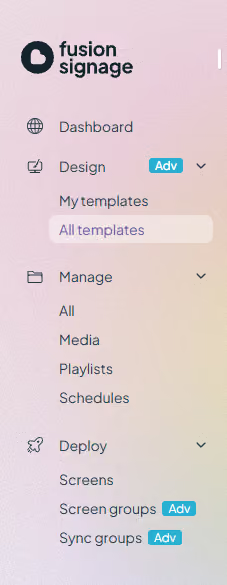
Instead of only showing Dashboard, Design, Manage and Deploy, the expandable sub-menu will include quick links to templates, media, playlists, schedules, screen groups and sync groups.
Enter: Updated Sub-Nav on the left menu
(Catchy, we know.) For you, it’s a quicker way to navigate to each area.
For new customers and those trialing, we hope it offers more clarity on important actions and what to do next.
Keen to get pre-release access?
Log into your Fusion Signage account, navigate to Settings then Experimental Features, toggle on and let the flashy new features hit your dashboard lickety-split.
Your feedback is always invited. support@fusionsignage.com.au
Can’t see Experimental Features? One of your Management-level users will need to switch it on for your company. Once they have, everyone in your company will have access.
Included In This Story

Fusion Signage
Australia’s friendliest digital signage software
Meet Fusion Signage. Australia’s friendliest digital signage software. Simple to learn, quick to deploy, powerful where it counts. World-class security, <3 minute response time, all-Aussie support and 99.9% uptime. Design, manage and deploy digital signage in minutes, from one neat place.
Related Media
Subscribe
Get the latest news and resources from Digital Signage Today.