Press Release
EasySignage Launches AI Assistant to Manage Digital Signage with Claude, ChatGPT, and Gemini
EasySignage now includes an MCP (Model Context Protocol) server that connects AI assistants directly to the platform, allowing users to manage screens, playlists, schedules, and media through plain language instead of dashboard clicks.
September 30, 2026
AI-Powered Screen Management via MCP
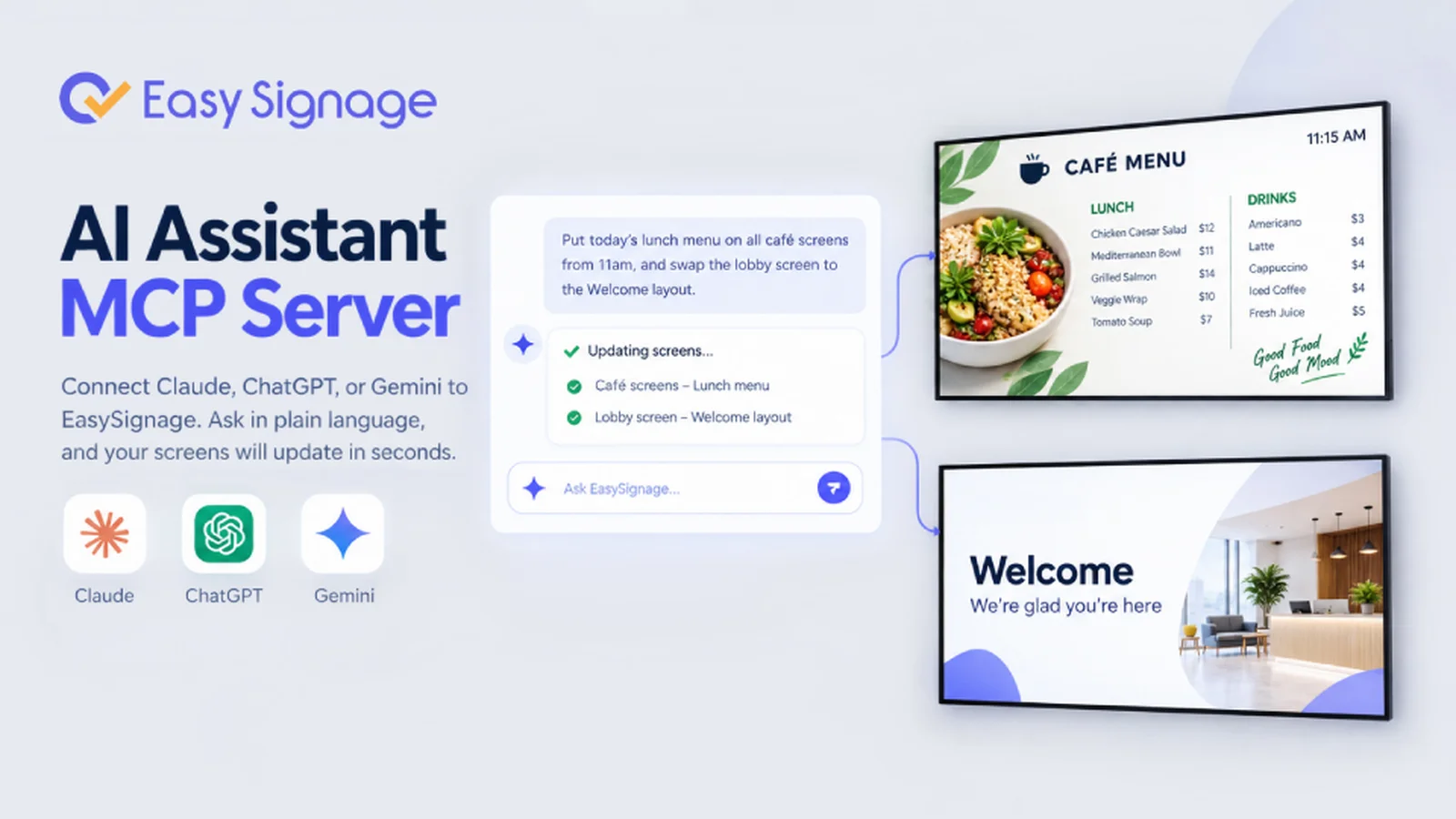
EasySignage has launched an AI Assistant feature that lets users connect Claude, ChatGPT, or Gemini to their digital signage account and manage their entire screen network using simple language.
The feature uses MCP (Model Context Protocol), an open standard that enables AI assistants to interact with external services. Users connect once, and the AI assistant can then perform real tasks on their screens, playlists, and schedules, based on permissions they grant.
Instead of navigating menus, clicking through forms, and repeating steps across locations, users can describe what they want in a single sentence during a chat with the AI assistant, and it handles the rest.
What Users Can Do with the AI Assistant
A connected AI assistant for digital signage performs two main functions:
- Product knowledge: The AI assistant, like Claude, ChatGPT, or Gemini, can search the EasySignage product documentation to answer questions about how the platform works. Users can ask how publishing works, what a channel is, or how to set up a video wall, all through their preferred AI application.
- Account actions: The AI assistant can read and modify actual content in the connected account, within the permissions granted by the user. Users can ask about which screens are offline, create a playlist and add media to it, or schedule a campaign across a group of screens for a specified date range.
Example requests include:
- "Which screens in the Office 1 group have been offline for more than a day?"
- "Create a playlist called Reception Loop and add the images from the Lobby folder."
- "Schedule the Summer Sale playlist on Screen Shop 2 from 1 December to 31 December."
Each request is processed in seconds, significantly reducing the time required compared to performing the same tasks manually, which would require navigating multiple dashboard screens and repeating steps for each location.
Built-in Security and Granular Permissions
EasySignage gives users full control over what the AI assistant can access and perform. A consent screen appears before the connection is made, letting users configure access levels for each area of their account; options include no access, read-only, or full access.
Even with full access, the assistant can create and update content, but it cannot delete screens, playlists, or media files. Each connection is secured with an API key that can be removed at any time, and each team member who connects will receive their own independent key.
Works with the AI Assistants Users Already Have
The feature supports Claude, ChatGPT, and Gemini CLI. Each one connects through the same EasySignage MCP server URL. The setup process takes a few steps: just paste the server URL in the AI application, sign in, and choose your permissions.
Who Benefits
The AI Assistant is designed for any team that manages digital signage, providing the biggest time savings for:
- IT managers overseeing large screen networks who need to quickly check screen status, rename devices, and reassign groups.
- Marketing teams running seasonal or time-sensitive campaigns that require scheduling content across multiple locations in one step.
- Multi-site operators across retail, hospitality, and corporate environments who need to make bulk changes without navigating separate settings for each location.
Availability
The AI Assistant feature is currently available on the EasySignage Premium and Enterprise plans. Users can try EasySignage for free with one screen ateasysignage.com.
Full setup instructions are published on theAI Assistant help page.
Read more on "How to Manage Digital Signage with Claude, ChatGPT, or Gemini".
Contact
EasySignage: support@easysignage.com
Included In This Story

EasySignage Digital Signage
Affordable, Powerful Cloud Digital Signage Platform. Manage Any Screen, Anywhere
EasySignage is a cloud-based digital signage software that lets any business design, schedule, and send content to any screen in minutes. With 60+ apps and features along with enterprise-grade security on Google Cloud, it's the smart choice for any industry. Free for 1 screen. Supports Android, Samsung, LG, Raspberry and more.
Related Media
Subscribe
Get the latest news and resources from Digital Signage Today.