Display Technology
What Is Wayfinding? How It Works and Why It Matters
When visitors get lost, time is wasted and experiences suffer. Digital wayfinding uses interactive maps and signage to guide people precisely where they need to go. This guide explores what wayfinding is, how it works, where it’s used, and why it has become essential in modern spaces.
January 20, 2026
 ChatGPT
 Grok
Grok Perplexity
 Claude
Few things create instant frustration like walking into a large building and not knowing where to go. Confusing signs, outdated maps, and poor layout design can leave visitors stressed, late, or ready to give up entirely. Staff lose time answering the same questions, and organizations risk making a bad first impression before any real interaction begins.
Effective wayfinding removes that friction. When people can navigate a space easily, they feel more confident, arrive on time, and engage more positively with the environment around them.
This article explores what wayfinding is, why it’s essential for modern spaces, and how digital solutions are transforming the way people find their way.
Main Takeaways:
- Good wayfinding lowers stress, supports staff, and keeps spaces running smoothly
- It works best when starting points, routes, signs, and destinations are all clear
- Signs, maps, colors, symbols, and screens should work together as one system
- Strong wayfinding systems use clear design, consistency, accessibility, testing, and upkeep
- Digital tools add value with live updates, interactive maps, language options, and data
What Is Wayfinding?
Wayfinding is the process people use to navigate from one place to another.
It involves understanding where you are, deciding which route to take, and recognizing when you’ve reached your destination.
To support this process, organizations rely on a combination of tools such as signs, maps, symbols, and color cues. When you glance at a “You Are Here” map in a shopping mall or follow color-coded paths through a hospital, you’re experiencing wayfinding in action. It goes beyond simple arrows on walls—it’s a coordinated system designed to make navigation intuitive, efficient, and stress-free.
New to Digital Signage?
Learn how screens can help your business communicate better, share real-time updates, and save on printing costs — all with tools you already have. Read how it works.
Why Effective Wayfinding Matters
When implemented effectively, wayfinding helps people move through buildings confidently and without confusion. Clear signs and maps reduce stress and make spaces easier to navigate, especially in large environments such as hospitals, airports, schools, and office buildings.
- Accessibility: Clear guidance helps everyone. This includes people with disabilities and people who speak other languages. Braille, tactile maps, and multi-language directions make the space fair and usable.
- Safety: In an emergency, wayfinding shows people how to get to exits fast. Clear directions can save lives by stopping panic and cutting down the time it takes to leave.
- Experience: When visitors find their way quickly, they feel calm and satisfied. This leads to better visits in stores, hotels, and other busy public places.
Insight: Hospitals with poor wayfinding lose more than $200,000 a year. They also experience lower patient satisfaction.
Applications of Wayfinding
Wayfinding is critical in many settings, yet it’s frequently overlooked as part of business effectiveness. Signs, maps, and digital tools help people navigate with confidence and reduced stress, with each environment applying wayfinding differently.
Healthcare and Hospitals
Hospitals are large and often stressful to navigate. Clear signs, color zones, and maps guide patients and families to the right department. Digital kiosks can update routes or let people search for doctors. Good wayfinding saves staff time and makes visits less overwhelming.
Retail and Shopping Centers
Shoppers often want to find stores quickly and without frustration. Directories, maps, and signage placed near entrances or food courts make navigation easier, while digital maps can also promote deals or special events. When done well, even basic wayfinding signage can enhance the shopping experience and encourage longer visits.
Education and Campuses
Navigating a large campus can be challenging for first-time visitors and new students. Outdoor signage, maps, and directories help direct people to classrooms, libraries, and sports facilities, while digital tools offer real-time updates for schedule or room changes. Despite these advancements, clear and consistent physical signage remains the foundation of effective campus wayfinding.
Corporate Offices
In large office environments, wayfinding helps guide both employees and visitors efficiently. Lobby directories, wall signage, and color-coded zones direct people to departments and meeting rooms, while digital screens display room schedules and availability. Kiosks or QR codes can further assist visitors without requiring additional staff support, helping operations run smoothly and reinforcing a professional first impression.
Residential Buildings (Apartments and Hotels)
Wayfinding also plays a big role in residential spaces. In hotels, guests rely on clear signs and directories to find their rooms, amenities, or event spaces.
In apartment complexes, wayfinding helps residents and visitors locate units, mailrooms, or shared facilities like gyms and parking. Digital screens in lobbies or elevators can provide updates, announcements, or emergency messages, making the experience safer and more welcoming.
How Wayfinding Works: The Four-Stage Process
To explain wayfinding, it helps to look at the steps people follow when moving through a space:
1. Orientation
This stage is about knowing the starting point. Tools like "You Are Here" maps, clocks, fountains, or other landmarks show people where they are. Without this first step, it is more difficult to make informed decisions about where to go next.
2. Route Decision
The next step in wayfinding is choosing a path. Signs, maps, and guides help people determine the best route, often based on factors like distance, safety, or ease of travel. Clear directions give individuals the confidence to move forward without hesitation.
3. Navigation
After choosing a route, people rely on arrows, floor lines, and repeated signage to confirm they’re moving in the right direction. These consistent visual cues reduce doubt and help make the journey feel smooth and predictable.
4. Destination Recognition
The final stage is recognizing arrival. Room numbers, store names, or other clear markers confirm the destination and this closure lets people know their journey is complete and successful.
In General, wayfinding works best when all four stages are clear, consistent, and easy to follow.
Key Elements of Wayfinding Systems
Wayfinding brings together multiple elements that guide people through a space. When these components work in harmony, navigation becomes clearer and more intuitive.
Signs
Signage is central to wayfinding. It provides direction, labels spaces, and confirms location through ceiling signs, wall signs, and freestanding markers. Clear, well-placed signage helps visitors navigate independently and reduces the need for staff assistance.
Examples:
- Hospitals use hallway signs to direct patients to departments
- Offices post wall signs to label conference rooms
- Airports use large overhead signs to guide travelers to gates
OptiSigns can complement physical signs with digital displays that update instantly, ensuring directions are always accurate and consistent.
Maps and Directories
Maps show the layout of a space. A "You Are Here" marker tells people where they start. Color routes or time estimates make navigation easier. Large maps at entrances give an overview. Smaller maps inside help people reorient as they move.
Examples:
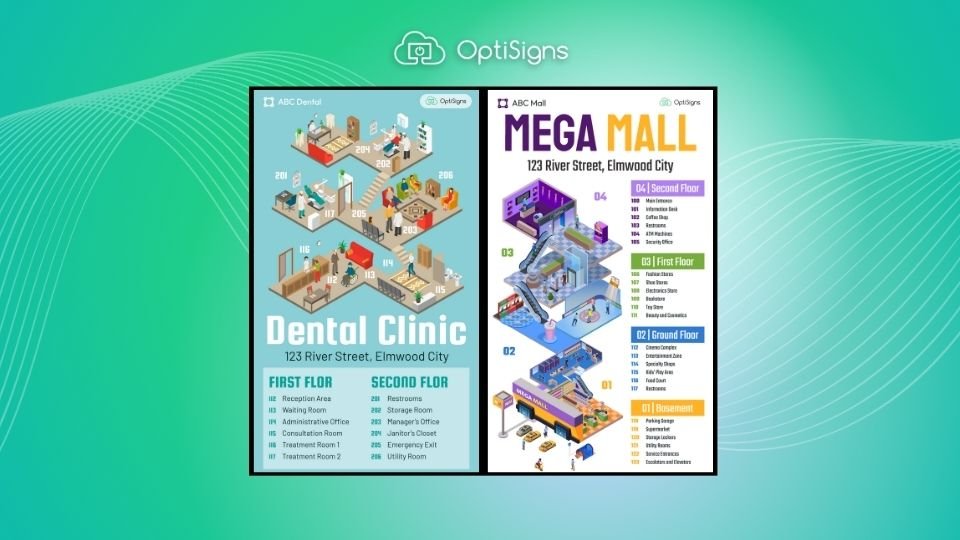
- Malls place digital maps near food courts and entrances
- Schools post campus maps at major pathways and parking lots
- Hotels use lobby directories to highlight amenities and floors
With OptiSigns, maps and directories can be interactive, searchable, and updated in real time across all locations from a single dashboard.
Colors
Color plays a powerful role in how people process information and navigate a space. It can be used to divide areas into clear zones—such as red for emergency services, green for food areas, or blue for staff-only sections. Repeating colors across walls, floors, and ceilings reinforces recognition and helps people orient themselves quickly. However, using too many colors can have the opposite effect and create confusion.
Examples:
- Hospitals using colored floor lines to guide visitors to different departments
- Sports arenas marking seating zones with bold, distinct colors
- Parking garages assigning colors to each level for easier recall
OptiSigns supports consistent color schemes across all digital signage, reinforcing both brand identity and wayfinding zones without adding design complexity.
Symbols and Icons
Symbols act as universal shortcuts, allowing people to understand directions and destinations at a glance. Icons such as a restroom figure, a suitcase for baggage claim, or a fork and knife for food are instantly recognizable across languages and cultures. Standard symbols, including the International Symbol of Access, further improve clarity and accessibility. When paired with text, symbols provide additional context and reduce the chance of confusion.
Examples:
- Airports using globally recognized icons for restrooms, exits, and baggage claim
- Train stations combining arrows and icons to guide passengers to ticket machines
- Public buildings displaying the International Symbol of Access on doors and elevators
OptiSigns’ built-in icon and template library makes it easy for teams to create signage that combines universal symbols with clear text for maximum clarity.
Digital Screens
Digital screens go beyond static signs by updating instantly. If a room changes, a hallway closes, or an event starts, screens can adjust in real time. Interactive kiosks let visitors search, filter by department, or get step-by-step help. Language options, large text, and audio directions make screens easier to use. QR codes let people take directions on their phones.
Screens also save staff time and show which areas confuse visitors most.
Examples:
- Hospitals use kiosks for patient check-in and room directions
- Malls offer interactive maps to locate stores and services
- Offices display live meeting schedules outside conference rooms
OptiSigns powers all of these features, including multilingual support, QR codes, and interactivity, making digital screens flexible tools for both visitors and staff.
Explore OptiSigns Products
Looking for tools that make wayfinding easy? Check out our options for content libraries, interactive kiosks, and PaaS. Explore Products
Types of Wayfinding Signs
Wayfinding works best when different types of signs are used together. Each type has a clear role in helping people move through a space:
- Identification Signs: These signs name or mark a location so visitors know where they are. Examples: room numbers, building names, restroom labels
- Directional Signs: These signs guide people along a path or toward a destination. Examples: arrows in hallways, floor decals, signs pointing to elevators or exits
- Informational Signs: These signs give details that help people use a space. Examples: opening hours, maps, "You Are Here" directories, parking information
- Regulatory and Safety Signs: These signs set rules or keep people safe. Examples: "Employees Only," "No Smoking," emergency exit signs, hazard warnings
Good wayfinding uses a mix of signs so visitors know where they are, where to go, and how to get there safely.
Seven Best Practices for Wayfinding Design and Implementation
Here are some easy rules to follow when making signs and maps so people don't get lost.
1. Design for Legibility and Clarity
Use fonts and colors that can be read quickly and from a distance. High-contrast combinations, such as white text on a dark background, stand out best. Use common symbols like the restroom icon or the red exit sign so people understand quickly.
2. Maintain Consistency Across All Touchpoints
Keep fonts, colors, terminology, and symbols the same across every sign. This applies to both static signs and digital displays. When everything looks the same, people feel confident and move without hesitation.
3. Ensure Accessibility for All Users
Design for everyone. Add braille and raised text on permanent signs. On digital screens, offer audio directions, large-text modes, and multiple language options.
4. Place Signage at Decision Points
Put signs and screens where choices are made—entrances, intersections, elevators, and exits. Digital screens here can show updates, emergency routes, or language options.
5. Test and Validate with Real Users
Ask first-time visitors, older adults, and people with disabilities to try your routes. Watch where they slow down or get confused and fix those spots. Use screen analytics to see common searches and improve wording or routes.
6. Govern Content and Updates
Decide who is in charge of updating maps, directories, and screens. Check content often to make sure it is accurate and easy to follow. Use templates and schedules on digital tools so all signs stay consistent and up to date.
7. Plan for Outages and Emergencies
Prepare for power or network issues. Keep backup static signs in key places. Cache core maps on devices and use an emergency mode that can show exit routes and safety steps right away.
Digital Wayfinding Implementation with OptiSigns
Adding digital wayfinding doesn't have to be hard. With OptiSigns, you can transform any screen into a smart helper that shows people where to go.
- Create Signs and Maps: Use simple design tools to create custom content. You don't need to be a designer—just drag, drop, and edit.
- Schedule Direction Changes: Show different directions at different times of day. For example, morning visitors can see one path, and evening visitors can see another.
- Update Screens From Anywhere: Change all your screens at once from one computer or even a phone. No need to run around swapping posters.
- Add Interactive Features: Use touchscreens or QR codes. Visitors can search for their destination and follow step-by-step directions.
Make Wayfinding Simple with OptiSigns
Wayfinding makes life easier for everyone. Hospitals, schools, offices, and malls all need clear signs and maps so people don't get lost. When visitors know where to go, they feel safe, calm, and welcome.
Digital signage takes this to the next level. They can change in real time, show many languages, and even let people search for their own path. This makes spaces smarter and friendlier.
OptiSigns gives you all the tools you need to do this. You can design maps and signs, update them from anywhere, and use almost any screen you already own. It's simple to set up, easy to manage, and works for both small businesses and large organizations.
Start Your Free Trial With OptiSigns
Ready to put clearer, smoother wayfinding to work in your space? Sign up for free today.
This blog was originally published on optisigns.com
Included In This Story

OptiSigns Digital Signage
Elevate Your Business With Digital Signage Software
OptiSigns is a cloud-based digital signage software that helps organizations create, manage, and scale engaging screen content across any display. With powerful integrations, flexible scheduling, and easy remote management, OptiSigns makes digital signage simple for teams of any size.
Related Media
Subscribe
Get the latest news and resources from Digital Signage Today.