Software
Digital Signage Device Management: MDM, RDM, and UEM Explained
Digital signage has come a long way since Carousel launched in 1997. Today’s networks can be surprisingly complex, making it hard to manage screens across multiple locations (even small ones). With players, tablets, kiosks, and embedded devices all needing security, monitoring, and updates, the challenge grows. Device management solves that.
December 16, 2025
 ChatGPT
 Grok
Grok Perplexity
 Claude
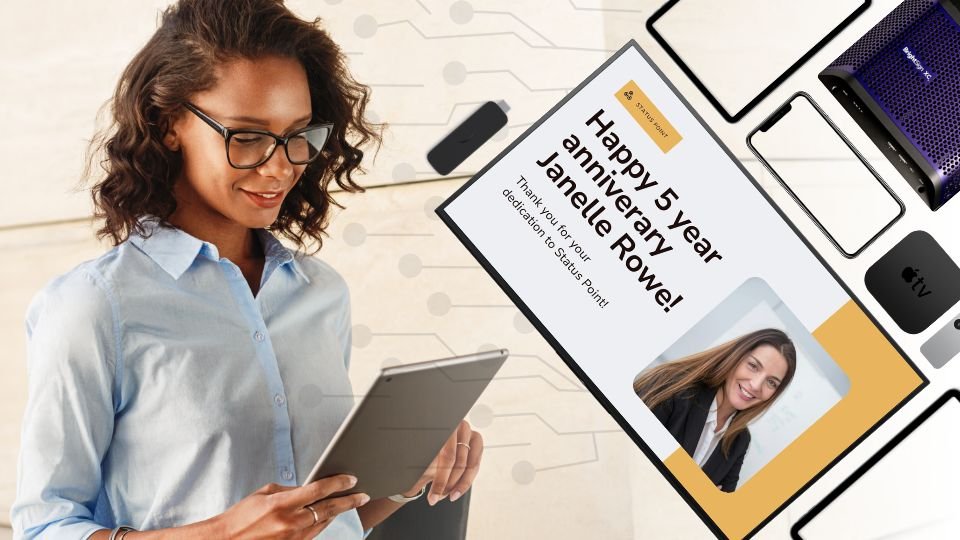
Digital signage networks have evolved dramatically since 1997, when Carousel 1.0 was released. While some organizations manage hundreds or thousands of displays, even a smaller digital signage network of, say, three endpoints can pose a challenge if the displays are distributed across multiple physical locations. Furthermore, networks rely on a mix ofmedia players,tablets,embedded displays,mobile devices,andkiosks, all of which need to be secured, monitored, and updated consistently.
Whether you call itMobile Device Management,Remote Device Management, orUnifiedEndpoint Management, the idea is the same: centrally managing your signage hardware. Because digital signage fleets rarely consist of a single device type, teams often encounter multiple management styles. Here’s how the major categories differ.
Mobile Device Management
Mobile Device Management (MDM)platforms, initially designed for managingphones and tablets, now support a wide range of signage devices.Carousel partners likeMokiandJamf, for instance, have expanded their MDM capabilities to include:
- iOS
- Android
- Apple TV
- Android-TV media players
- MacOS
- BrightSign
Because of this evolution,MDM has become the catch-all termthe industry uses – even when managing devices that aren't technically "mobile" – and it's also the most widely searched and recognized term.
Remote Device Management
While MDM focuses on mobile devices,Remote Device Management (RDM)refers to managingdevices remotely, regardless of whether they move. It's the most flexible term for modern digital signage networks because it encompasses a wide variety of endpoint types:
- Dedicated media players– purpose-built devices like BrightSign players designed for continuous signage playback can be managed through BSN Cloud or Moki.
- Android-based displaysfrom vendors such as Sony and Philips — when using their Android‑powered "Professional" lines — run manufacturer-provided platforms, Sony Remote Device Manager and Philips Wave, respectively.
- Samsung Tizen TVscan be managed through Tizen Business Manager.
- Amazon Signage Stickis managed by the Amazon Signage mobile app.
If your signage network relies heavily on BrightSign players, integrated displays, or other dedicated media players, you're effectively practicing RDM – remote control of non-mobile endpoints.
Unified Endpoint Management
Unified Endpoint Management (UEM)is the enterprise-standard approach to device management. It combines MDM and RDM capabilities into a single platform that managesall endpoints across an organization, regardless of OS or hardware type.
Key characteristics of UEM platforms:
- Cross-platform support– Windows, macOS, ChromeOS, iOS, Android, tvOS, and purpose-built signage devices.
- Unified policies– apply security, configuration, and app deployment policies consistently across all devices.
- Remote monitoring & troubleshooting– track device health, connectivity, and performance from a single dashboard.
- Scalability– manage hundreds or thousands of endpoints across multiple locations.
- Automation & compliance– automate updates, device provisioning, and compliance reporting.
Why it matters for digital signage:UEM enables signage teams tomanage an entire ecosystem of endpoints from a single platform, combining the benefits of MDM and RDM. Whether the network includes tablets, media players, or vendor-ecosystem devices, UEM provides the consistency, security, and scalability modern signage operations require.
Is there a single UEM that can manage every device type – including all commercial signage players?Not yet. No UEM currently supports every proprietary signage OS or hardware platform, but organizations don't need a perfectly universal tool to take advantage of unified management. Carousel continues to collaborate with management partners to broaden support and improve compatibility wherever it's feasible.
Carousel partner FileWaveis one example: a UEM platform that supports a wide range of enterprise endpoints and brings unified management to mixed-OS signage environments. It's not intended to replace vendor-specific tools where they excel, but rather to serve as another strong option for teams looking for broader visibility across diverse fleets.
MDM, RDM, and UEM … Which One Is Better?
The short answer is:none of them are universally better – it depends on your environment.The "best" option is the one that aligns with your existing devices, IT workflows, and organizational needs.
It's also worth noting thatno single management platform is designed to cover every type of digital signage endpoint, especially dedicated media players.That's completely normal – which is why most organizations choose the tool or combination of tools that matches the devices they already deploy.
For example:
- If your fleet is made up entirely of BrightSign players,usingBSN.cloud(BrightSign's own management platform) is usually all you need.
- If you deploy a mix of Apple TVs and other Apple devices,a purpose-built Apple MDM likeJamfmay be the most efficient choice.
- If your signage network includes a mix of iOS, Android, Windows PCs, and traditional media players,a UEM platform such asFileWavecan help unify most of your endpoints under a single system.
- If your screens are mostly Android-based smart displays or set-top devices,an Android-specific MDM likeMokimay be the most practical option.
- If your endpoints are a patchwork of vendor-specific signage hardware,you may rely primarily on each vendor's built-in device management tools, since they are tailored for their own operating systems.
In many real-world deployments, organizations end up using ahybridapproach: vendor tools for dedicated players, MDM for mobile OS devices, and sometimes a UEM to tie together mixed fleets.
Provisioning Made Simple with Carousel
No matter how you manage your fleet – MDM, RDM, UEM – Carousel makes player onboarding consistent and straightforward. Carousel provides provisioning URLs, tokens, and clear configuration guides for all supported devices, ensuring each player is securely connected to your Carousel Cloud account with minimal effort.
Once your devices are provisioned, Carousel takes over, reliably delivering and updating your content across your entire network. Your chosen management platform continues to handle device-level tasks, including OS maintenance, security settings, and hardware updates. At the same time, Carousel focuses on what it does best: keeping your screens fresh, accurate, and up to date.
If you’re evaluating your device management approach or planning a mixed-hardware rollout,our team can help explain the multitude of workflow options and provide solutions for your environment. Carousel works wherever you are – so you can build the signage ecosystem that works for you. Learn more about mixed device management for digital signage.
Included In This Story

Carousel Digital Signage
Keeping people informed, safe and connected.
Carousel is powerful digital signage software for screens of all sizes, designed to keep your audience informed and safe.
Related Media
Subscribe
Get the latest news and resources from Digital Signage Today.